Toonpics - Cartoon Photo Edit
- 4.6
- Rating
- 1.00M
- Installs
- Free
- Price
 Analysis by App-foxy
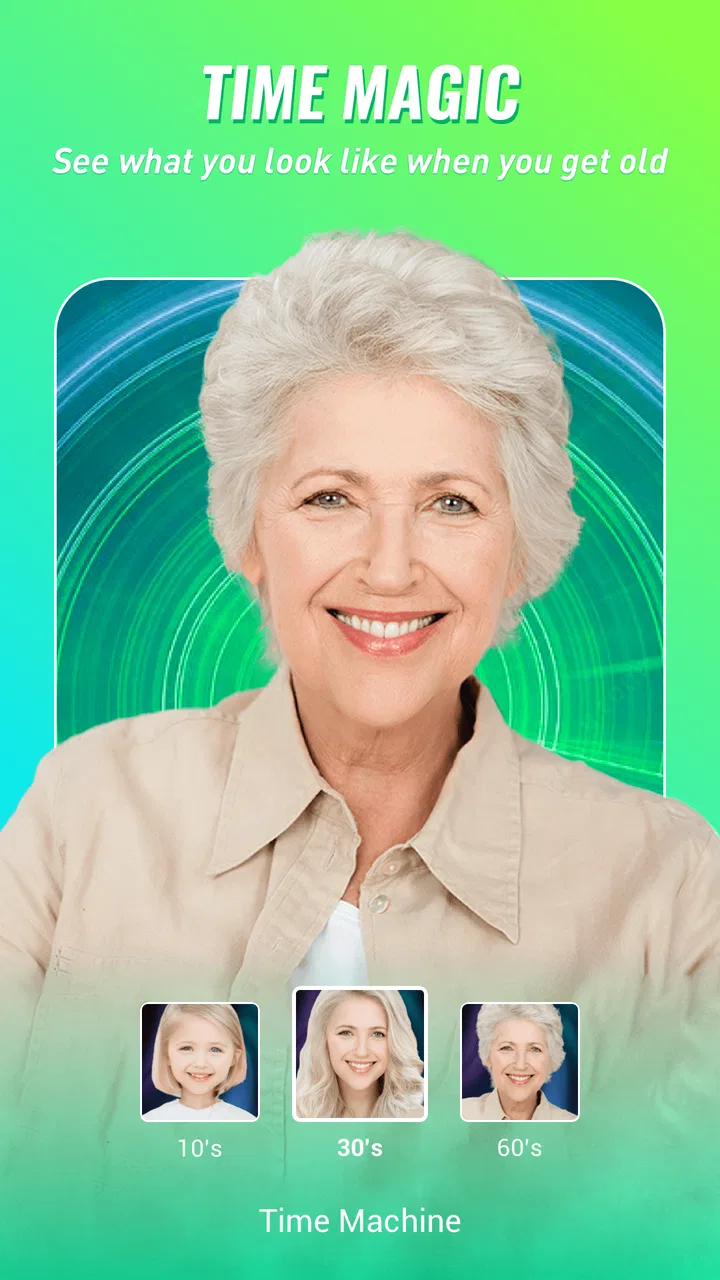
I approached Toonpics - Cartoon Photo Edit as a photo app for people who want a quick visual change rather than a full editing workstation. Its focus is playful transformation: aging effects, animal-face treatments, and other AI picture tools that can turn an ordinary portrait into something worth sharing. After using it, my impression is that its appeal comes from immediacy. You choose a photo, try a style, and judge the result visually instead of spending time adjusting sliders.
That simplicity makes it easy to recommend to curious users who enjoy experimenting with selfies, family pictures, profile images, or casual social posts. It is less convincing for photographers who need precise control, repeatable color work, layers, or professional retouching. The app sits in the entertainment side of photography, and that distinction matters when deciding whether it belongs on your phone.
What the app feels like in everyday use
Toonpics is a free photography app from Hideaway Technology Limited. It is available for users aged Everyone, supports devices running Android 6.0 or later, and has reached over a million installs. Its average rating is 4.6 from around eleven thousand ratings, which suggests that the basic idea connects with a sizeable audience, although a rating alone cannot tell you whether every effect suits your taste.
You May Also Like

 Blood Strike: 2.5 Anniversary
Blood Strike’s Loadouts Turn Every Drop Into a Tactical Gamble
A close look at Blood Strike’s custom loadouts: how fast access to signature weapons reshapes its battle royale rhythm, rewards preparation, and narrows the gap between fights.

 Pandora - Music & Podcasts
Pandora’s Music Is Easy to Start, but Harder to Recover
Pandora’s strength is its low-effort path from a seed to a station. Its weak spot is how much confidence it asks you to place in connection, setup, and quiet recovery.

 8 Ball Pool
 Is Built on Rivalries, Rematches, and Routine
A close look at the rivalries, rematches, shared routines, and unanswered safety questions that turn a quick pool match into a persistent mobile community.

 Samsung Music
’s Quiet Strength Is Playing What You Already Own
Its reach comes less from spectacle than from dependable access to a personal library. That simplicity is both the app’s strongest retention engine and its ceiling.

 AccuWeather: Weather Radar
AccuWeather Review: A Quick, Clear Forecast for Everyday Decisions
For everyday plans, the best forecast is the one you can understand quickly. AccuWeather makes rain timing, radar, and local conditions easy to act on, with a few trade-offs.

 Hill Climb Racing
Why Hill Climb Racing Still Turns Crashes Into One More Run
A tiny car, a bumpy hill and one more upgrade: Hill Climb Racing keeps resurfacing because its simple chaos makes every near-miss feel personal.
More From Our News Desk
View All News


The current version is 1.7.3. I would think of it as a collection of visual experiments rather than a conventional camera replacement. The practical workflow is straightforward: start with a suitable image, select an AI effect, wait for the transformation, and decide whether the result is good enough to keep or share. That short loop is the reason the app can feel more approachable than an editor filled with technical controls.
The strongest results usually come from photos where the subject is clear and the face is reasonably visible. A well-lit portrait with one obvious person gives an effect a better starting point than a dark group photo, a side profile, or an image crowded with objects. This is an important everyday tip: if the first result looks confused, changing the source photo may help more than repeatedly applying the same effect.
For example, I can imagine using it during a family chat when someone sends a portrait and everyone wants to see an exaggerated older version or a playful animal interpretation. The value is not perfect realism; it is the speed with which a normal picture becomes a conversation starter. That makes the app especially suitable for casual sharing, birthday jokes, profile-picture experiments, and short-lived social content.
Speed expectations before you start
AI image effects naturally feel different from ordinary brightness or crop tools. A simple adjustment can appear immediately, while a generated transformation needs time to process the selected photo. I would not install Toonpics expecting every result to appear as quickly as a basic filter. The sensible expectation is a short wait that varies with the image, effect, device, and connection conditions involved in processing.
The app’s design is most comfortable when you treat each attempt as a small experiment. Pick one or two promising photos, try a style, and inspect the result before moving on. Rapidly submitting a long queue of images is less attractive because the fun depends on seeing whether each transformation actually worked. This also helps conserve patience and avoids filling your gallery with near-duplicates.
A useful workflow is to prepare a small album first. Keep the original portraits untouched, then send copies into the app. That way, an amusing but imperfect result remains separate from the source image, and you can compare different treatments without losing the clean original. This is a small habit, but it makes an AI photo app much easier to use repeatedly.
I also prefer judging speed by the whole interaction rather than only the processing wait. If choosing an effect, reviewing a preview, and saving the final image are clear, a modest delay is easier to accept. If you are trying to create something for an immediate post, test the effect before you need it. That avoids discovering at the last moment that a particular portrait does not produce a convincing result.
Where heavier use can become frustrating
Toonpics is at its best in short sessions. The workload becomes more demanding when you process many high-resolution portraits, repeatedly regenerate similar images, or explore several AI styles in succession. I would be cautious about treating it as a batch-production tool for a large event album. Its creative concept encourages sampling, but sampling many images can make the process feel slower and less predictable than editing with standard filters.
There is also a quality trade-off in repeated experimentation. An effect may look excellent on one face and awkward on another because facial angle, hair, glasses, shadows, and background details change the visual input. Rather than assuming the feature itself is inconsistent, I would first test a clean front-facing image and then compare it with the more difficult photo. That gives you a fairer idea of whether the limitation is the source material.
For heavy use, I would work in small groups and save successful results as I go. This is more reliable than creating a large unsorted pile and trying to remember which version looked best. Naming or organizing the exported images outside the app can also help, especially if you are making several versions for different social profiles.
Another practical consideration is device comfort. AI processing can make a phone feel busier than it does during ordinary browsing, particularly on older hardware. I would avoid running a long session while the phone is already low on battery or handling other demanding tasks. The app is free to download, but in-app purchases range from $0.99 to $99.99 per item, so I would also review any purchase prompt carefully before continuing through an extended creative session.
Reliability and recovering from an imperfect result
Reliability here is not only about whether the app opens. It is also about whether the result is usable, whether the original image remains safe, and whether you can recover gracefully when an effect misses the mark. My main advice is simple: keep originals outside the editing workflow and treat generated images as new copies. That protects you from making a playful experiment your only version of an important photograph.
When an output looks strange, I would not immediately conclude that the app has failed. AI portrait effects can be sensitive to composition. Try a tighter crop, remove a distracting background where possible, or choose a face with clearer lighting. A front-facing image with visible eyes and a simple background is usually a better test image than a candid shot taken in motion.
Recovery is also easier when you avoid judging a preview too quickly. Some transformations are designed to be dramatic, so an unusual result may be intentional rather than broken. I look for practical signs of success: does the face remain recognizable, are the main features placed naturally, and does the style fit the mood of the photo? If the answer is no, I save nothing and return to the original rather than trying to rescue a poor transformation.
I would still keep expectations measured. A playful AI app is not a substitute for a backup system, a professional retoucher, or a detailed editor. If a photo matters, preserve it separately. If the result is only for a joke or temporary post, the occasional odd output is easier to accept because the stakes are low.
Device limits and choosing the right phone
Android 6.0 or later gives Toonpics a broad compatibility range, which is helpful if you are using an older phone rather than a recent flagship. However, operating-system compatibility does not guarantee identical comfort across devices. The phone’s processor, available memory, storage space, screen quality, and current workload can all affect how pleasant an image-processing session feels.
On an older device, I would keep the workflow modest: use one image at a time, close unrelated apps, and leave enough storage for saved results. Storage matters because keeping the original, several experiments, and the chosen final image can quietly create duplicates. If your phone is already crowded, review the saved copies after a session instead of allowing every attempt to remain in the gallery.
On a newer phone, the main advantage is convenience rather than a change in what the app does. You can explore more styles without the device feeling as constrained, but the quality of the source photo still matters. A powerful phone cannot fully correct a face hidden by shadow, a blurred subject, or a complicated composition.
iPhone users should check the appropriate platform listing for availability and device requirements before downloading, while Android users can use the stated Android 6.0 minimum as a basic compatibility guide. In either case, I would not choose this app solely because a device technically supports it. The better question is whether your phone has enough free space and whether you are comfortable with an AI workflow that may need more processing than a normal filter.
How it compares with familiar photo editors
Compared with a standard editor, Toonpics is more playful and less precise. Traditional photography apps are better when I want to correct exposure, straighten a horizon, remove a small distraction, or make a consistent set of images look alike. Their controls are predictable, and the result usually follows the adjustment I make.
Toonpics offers a different kind of reward. Instead of improving a photograph in a technically controlled way, it changes the character of the image. The aging and animal-face ideas are more noticeable than ordinary color presets, so the app is a stronger choice when the goal is amusement, surprise, or a distinctive profile image.
It also differs from a full portrait-retouching app. Retouching tools are preferable when you want subtle skin correction, careful reshaping, or a natural finish that preserves the original mood. Toonpics makes more sense when you welcome an obvious transformation and do not need every facial detail to remain perfectly realistic.
For a serious photo project, I would use a conventional editor first and reserve Toonpics for selected images that benefit from a deliberately unusual treatment. That combination is more practical than expecting one app to handle both professional correction and playful AI effects equally well.
Who will enjoy it, and who should skip it
I think Toonpics is a good fit for casual creators, families, social-media users, and anyone who likes seeing how a familiar face changes under an imaginative style. It is also approachable for people who find advanced editors intimidating. You do not need to understand curves, masks, or color profiles to get something entertaining from a portrait.
The app is less suitable for photographers who need exact control, photographers working with many images at once, or users who want a natural correction rather than a transformation. I would also skip it if your main goal is camera capture, detailed manual editing, or dependable consistency across a professional collection.
Parents and younger users should still remember that an Everyone age rating describes the app’s broad content suitability, not the quality of every image someone chooses to upload or share. A little judgment is useful when transforming pictures of other people, especially if the result could embarrass them. The funniest effect is not automatically the right one to publish.
My performance verdict after using it
Toonpics succeeds because it keeps the creative decision small: choose a picture, choose a visual idea, and see what happens. Its speed is best understood as interactive rather than instant, and its comfort depends on the phone, the image, and how many effects you attempt in one sitting. I found the app more convincing for occasional experiments than for demanding, high-volume editing.
The free entry point makes it easy to try, while the range of in-app purchase prices means I would pay attention during the workflow and avoid assuming that every option is included. The developer, Hideaway Technology Limited, has positioned the app around accessible AI picture functions rather than a deep professional toolkit, and that focus is clear in the experience.
My recommendation is straightforward: install it if you want quick, shareable portrait surprises and are happy to accept occasional uneven results. Keep your original photos, use clear source images, process in small batches, and judge each output before saving or sharing it. If you need precision, natural retouching, or a dependable production workflow, a conventional photography editor will serve you better. For lighthearted visual experiments, however, this app has enough personality to earn a place on an Android device that meets its minimum requirement.
FAQs for Toonpics - Cartoon Photo Edit
01What is Toonpics - Cartoon Photo Edit used for?
Toonpics - Cartoon Photo Edit is an application designed to transform your photos into cartoon-like images. Using a variety of filters and effects, it allows users to easily convert regular photos into artistic renditions that resemble hand-drawn cartoons. Whether for fun or creative expression, this app offers a unique way to enhance your photos.
02Is Toonpics available for both Android and iOS devices?
Yes, Toonpics - Cartoon Photo Edit is available for download on both Android and iOS platforms. Users can find it on the Google Play Store for Android devices and the Apple App Store for iOS devices. This ensures a wide range of compatibility across different smartphones and tablets.
03Does Toonpics require an internet connection to function?
Toonpics - Cartoon Photo Edit primarily operates offline, allowing users to apply filters and effects without needing an internet connection. However, an internet connection may be required for downloading additional content or updates, and for accessing any cloud-based features the app might offer.
04Are there in-app purchases or advertisements in Toonpics?
Toonpics includes in-app purchases that allow users to unlock premium features, such as exclusive filters and effects. Additionally, the app may display advertisements. Users looking for an ad-free experience and full access to all features might consider upgrading to a premium version if available.
05How user-friendly is Toonpics for beginners?
Toonpics - Cartoon Photo Edit is designed with a user-friendly interface that caters to both beginners and experienced photo editors. The app offers intuitive controls and easy navigation, making it simple for users to apply cartoon effects and explore various editing options without a steep learning curve.
Pros
- User-friendly interface for easy navigation.
- Wide variety of cartoon styles available.
- Quick processing with high-quality results.
- Regular updates with new features and filters.
- Supports high-resolution photo exports.
Cons
- Limited free features; subscription needed.
- Occasional in-app ads can be disruptive.
- Requires internet for some features.
- Can be resource-intensive on older devices.
- Limited support for non-standard image formats.

Toonpics - Cartoon Photo Edit
Gallery